CrenoSync

In every plan

A site that looks like you

Your rooms, your pictures, your words in French and English: a complete booking website in your colours, with no transaction fees from CrenoSync on what it sells.

Admin portal tabs: Site Settings

What you can do

Your site, your way

A home page that sells your rooms

Your name or logo, a banner, your rooms with their pictures and a Book button that stays in reach. Contact and privacy pages are already there, and a Jobs page if your plan has it.

  • Your logo, your brand colours
  • Your texts in French and English
  • A cookie notice: accept or decline
The home page of the demo business’s website Example

Every room, its own page section

Players, length, suggested group, description, price per person and a button that opens its booking. Change a room in the portal and the site follows.

  • Pictures uploaded from the portal
  • Rooms in the order you choose
  • A room switched off disappears from the site
The rooms page of the demo business’s website Example

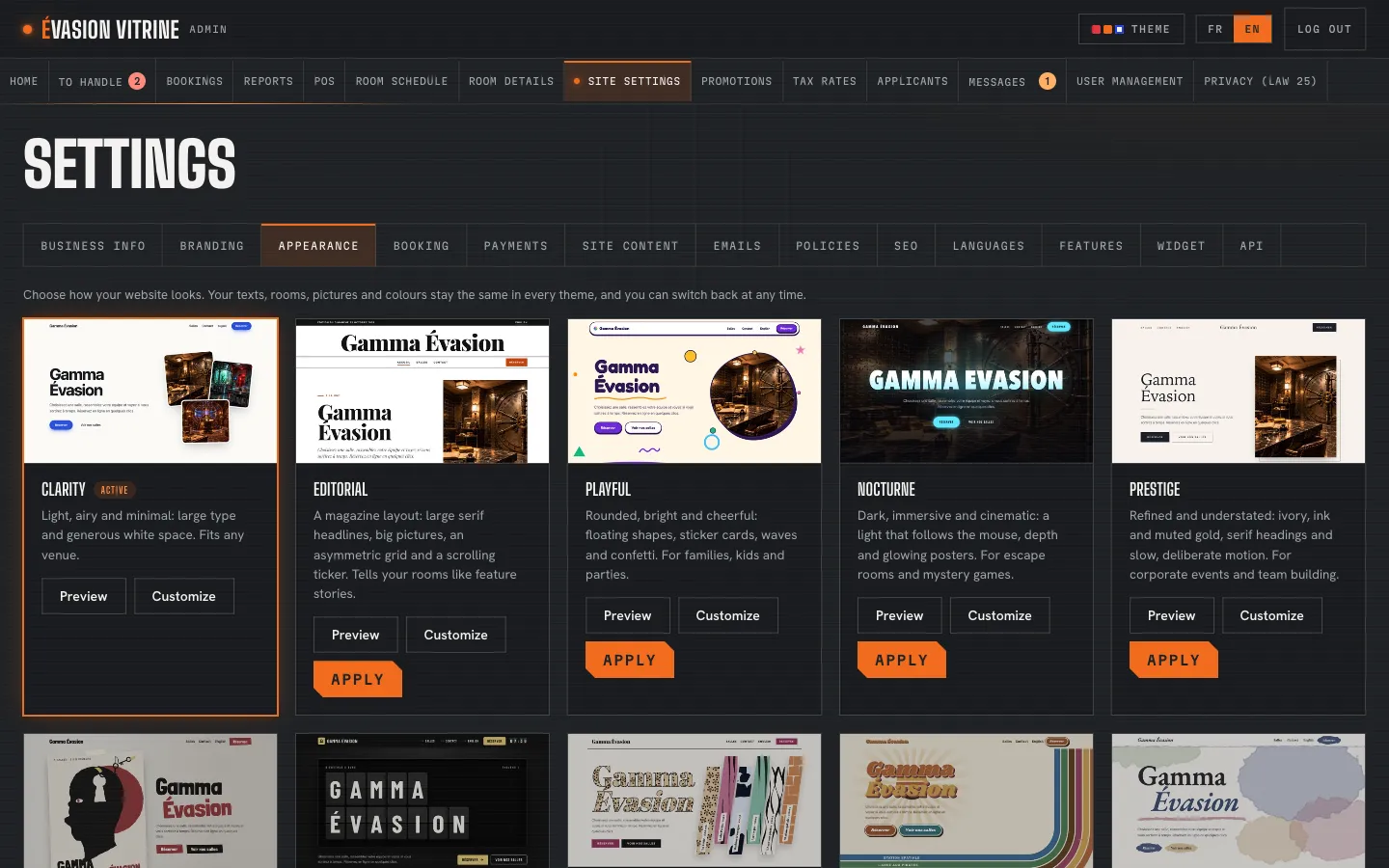
Five themes, previewed before you choose

Try each theme on your real site, with your rooms and pictures, before applying it. Switch back at any time. With Design+, seventy more, and you choose their palette, fonts, sections and effects.

  • Five themes in every plan
  • Preview on your own site, only you see it
  • Seventy premium themes with Design+
Site Settings › Appearance, with the themes to preview Example

An example Example

A new look, in one afternoon

How a business changes its site’s look without a web designer.

  1. 1:00 PM

    The owner opens Site Settings › Appearance and previews the Nocturne theme on their own site.

  2. 1:10 PM

    They upload their logo and pick their two brand colours in Branding.

  3. 1:25 PM

    They rewrite the home page’s welcome in French and English, in Site content.

  4. 1:40 PM

    They apply the theme: customers see the new site right away, rooms and bookings untouched.

On a phone

Most bookings start on a phone

Every theme is built for small screens first: a large Book button, rooms one under the other, a menu that folds away.

The demo business’s website on a phone Example

What you set

You decide

  • Logo and brand colours
  • Theme, previewed before it is applied
  • Home page texts and banner
  • Your rooms’ pictures and descriptions
  • Titles and descriptions for search engines
  • French, English or both
  • Contact page and form
  • Jobs page (by plan)

Questions

Can I keep my current website?

Yes. The booking widget puts your rooms and open times on your own site with a short snippet of code; customers finish on your CrenoSync booking site, where the deposit is paid.

Do I need a designer?

No. Themes take your logo, colours, texts and pictures. We set up the first version with you during the pilot project.

What is Design+?

An option with seventy premium themes and a customisation screen for palettes, fonts, sections and effects.

See it with your rooms

Want the tour with your own business?

We show you the site and the admin portal set up with your rooms, rates and schedules, in French or English.