CrenoSync

Opérations and Pro plans

Keep your site. Add our booking.

Already have a website you like? Keep its design and its address. The booking widget brings your rooms and open times into its pages, and the booking API lets a developer build booking right into it. Behind both: the same schedule, payments and admin portal.

What you can do

Your design, our booking

Your rooms, on your pages

Paste a short snippet of code where booking should appear. Customers choose a room, their group, a day and a time inside your page, then finish on your CrenoSync booking page, where the time is held and the deposit paid.

  • One script tag, no plugin
  • In French or English
  • Your brand colour, sized to your page
The booking widget on a business’s own website (a sample site) Example

You choose where and what

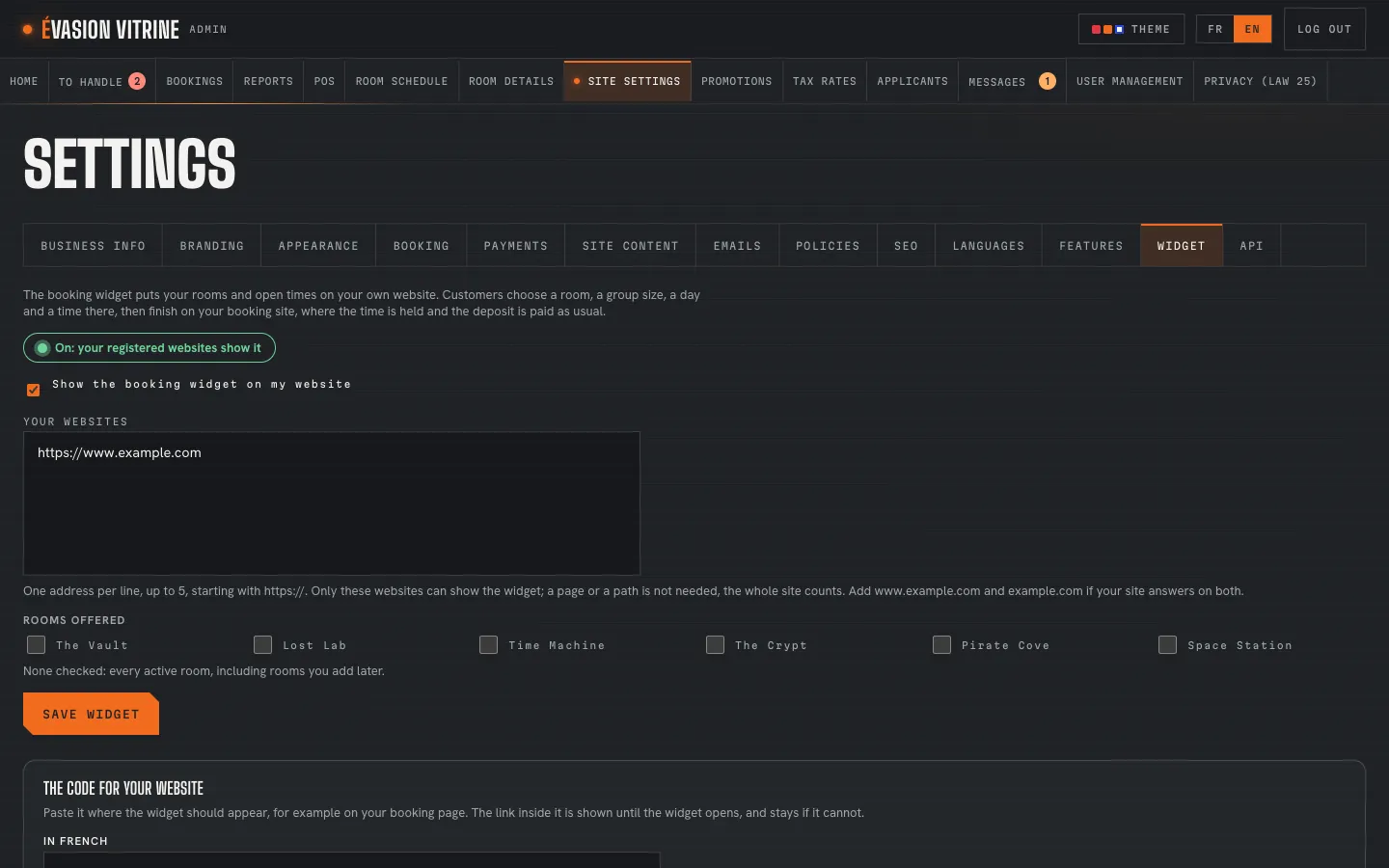
In Site Settings › Widget, register the websites allowed to show it and choose the rooms it offers. Preview it, copy the snippet, and switch it on when everything is ready. Any other website is refused.

  • Up to five websites
  • Every room or the ones you pick
  • A room opened first, if you like
Site Settings › Widget: the sites allowed and the rooms offered Example

The booking API, for a custom build

For a site built by a developer: activities, availability, prices, holds and checkout through a documented API, with a full reference and a sample website to start from. Customers pay on CrenoSync’s page, with your own payment provider: card numbers never touch your site.

  • A publishable key and a secret key
  • The reference, in OpenAPI
  • A sample website to download

An example Example

A booking page, in an afternoon

A business keeps the website its agency built, and adds booking to it.

  1. 1:00 PM

    The owner opens Site Settings › Widget and adds their website’s address.

  2. 1:05 PM

    They keep their three rooms offered, preview the widget and copy the snippet.

  3. 1:20 PM

    Their web designer pastes it on the site’s Book page, between its header and its footer.

  4. 1:30 PM

    The owner switches the widget on: the page now shows the rooms and their open times.

  5. 9:40 PM

    A customer picks a time on the business’s own site and pays the $50.00 deposit on its CrenoSync booking page.

What you set

What you set

  • The websites allowed, up to five
  • The rooms the widget offers
  • Its language, French or English
  • The room it opens first
  • On or off, at any time
  • API keys, made by the owner
  • The websites allowed to use a key
  • Where customers come back after paying

Questions

Will it fit my site’s design?

It sits inside your page, takes your brand colour and adjusts its height to its content. Your header, footer and design stay as they are.

Do I need a developer?

Not for the widget: if you can paste a piece of code into your site’s editor, you can add it, or your web designer can in a few minutes. The API is for developers.

And if I have no website?

Then your CrenoSync site is your website: a complete booking site in your colours, five themes included, in every plan.

Which plans have them?

The widget comes with the Opérations plan and the booking API with the Pro plan. Both are tested and ready for pilots.

See it with your rooms

Want the tour with your own business?

We show you the site and the admin portal set up with your rooms, rates and schedules, in French or English.